Deploying Matter 1.3: Fix Smart Home Integration Fast
Deploying Matter 1.3 significantly enhances smart home device interoperability, and addressing common integration failures quickly ensures a stable and efficient connected environment for users.
Are you struggling with your smart home devices after updating to Matter 1.3? You're not alone. Understanding how to tackle issues when deploying Matter 1.3 integration failures is key to maintaining a functional and efficient smart home ecosystem. This guide will walk you through rapid troubleshooting to get your devices talking again, often in under 30 minutes.
Understanding Matter 1.3 and its foundational improvements
Matter 1.3 represents a significant leap forward in smart home technology, aiming to unify diverse devices under a single, open standard. This iteration introduces several enhancements designed to improve reliability, security, and ease of use, making smart home integration more straightforward than ever before. However, even with these advancements, users can still encounter challenges during deployment.
The core philosophy behind Matter is to eliminate the fragmentation that has plagued the smart home market for years. By providing a universal language for devices from different manufacturers, Matter promises a future where your smart lights, thermostats, and security cameras can all communicate seamlessly, regardless of brand. Version 1.3 builds upon this foundation, refining existing protocols and adding new device types and features.
Key enhancements in Matter 1.3
- Improved device pairing processes, making initial setup faster.
- Enhanced security features to protect your home network.
- Broader compatibility with new device categories like smart appliances.
- More robust error handling and diagnostic tools for developers.
These improvements are critical for a smoother user experience, but they also introduce new variables that can impact deployment. Understanding these underlying changes is the first step toward effectively troubleshooting any integration issues you might face. The promise of Matter 1.3 is a truly connected home, but realizing that promise often requires a bit of technical finesse.
In essence, Matter 1.3 strives to simplify the complex world of smart home technology. It aims to reduce the need for multiple apps and hubs, streamlining control and automation. While the vision is compelling, the reality of integrating new software and hardware can present hurdles. Familiarizing yourself with the core principles of this update will empower you to navigate these challenges more effectively, ensuring your smart home operates as intended.
Initial checks: the foundation of rapid troubleshooting
Before diving into complex diagnostics, a series of simple, yet crucial, initial checks can often resolve many common integration issues when deploying Matter 1.3. These steps are designed to quickly identify and rectify problems related to basic connectivity, power, and software, saving you valuable time and frustration. It's surprising how often a seemingly complex problem can be traced back to a forgotten switch or an outdated application.
Start by ensuring all your devices are powered on and within range of your Matter controller or hub. A weak signal or an unplugged device is a frequent culprit for connectivity failures. Next, verify that your Wi-Fi network is stable and broadcasting on a compatible frequency (2.4 GHz is often preferred for many smart home devices). Intermittent network dropouts can sever the communication between your devices and the Matter ecosystem.
Essential quick checks for Matter 1.3 deployment
- Power Cycle Devices: Turn off and then on your smart devices, Matter controller, and even your Wi-Fi router. This simple reset can clear temporary glitches.
- Check Network Connectivity: Ensure your Wi-Fi network is active and stable. Test other devices on the same network to confirm.
- Update All Software: Verify that your Matter controller app, device firmware, and smartphone operating system are all running the latest versions. Outdated software is a common source of incompatibility.
Moreover, confirm that your Matter controller (e.g., Apple HomePod mini, Google Nest Hub, Amazon Echo) is properly configured and connected to the internet. The controller acts as the central brain for your Matter network, and any issues with it will cascade to all connected devices. A quick review of its status indicator lights or app interface can provide immediate insights.
Finally, consider the physical environment. Obstacles like thick walls, large appliances, or even other wireless devices can interfere with signal strength. Try temporarily relocating devices closer to the Matter controller to see if connectivity improves. These initial checks, though basic, form the bedrock of effective troubleshooting and should always be the first line of defense against integration failures.
Common network configuration pitfalls and solutions
Network configuration is often the most intricate part of deploying Matter 1.3, and minor missteps can lead to significant integration failures. Smart home devices, especially those leveraging Matter, rely heavily on a stable and correctly configured home network to communicate effectively. Understanding common pitfalls and their solutions is paramount to ensuring a seamless experience.
One prevalent issue is incorrect Wi-Fi band selection. Many Matter devices, particularly older models or those with lower power requirements, primarily operate on the 2.4 GHz band. If your router is configured to exclusively use the 5 GHz band, or if your device is attempting to connect to the wrong one, integration will fail. Ensuring your network offers a stable 2.4 GHz option and that your device is directed to it is a critical first step.
Addressing specific network challenges
- Router Firewall Settings: Aggressive firewall settings can block essential communication ports for Matter devices. Temporarily disabling the firewall (with caution) or adding specific port exceptions might resolve the issue.
- IP Address Conflicts: If two devices on your network are assigned the same IP address, it can cause erratic behavior. Rebooting your router often resolves this by reassigning IPs, or you can configure static IP addresses for critical devices.
- Mesh Network Considerations: While mesh networks offer excellent coverage, some configurations can confuse smart devices during setup. Ensure your mesh system is optimized for IoT devices and consider temporarily disabling nodes further away during initial pairing.
Another common pitfall involves network congestion. A home network overloaded with multiple streaming devices, gaming consoles, and smart gadgets can experience slowdowns, impacting Matter device responsiveness. Prioritizing traffic for your Matter controller and essential smart devices through Quality of Service (QoS) settings on your router can mitigate this.
Furthermore, ensure your router's firmware is up to date. Manufacturers frequently release updates that improve compatibility with new standards like Matter 1.3. An outdated router firmware might lack the necessary protocols or optimizations for seamless Matter integration. Regularly checking for and applying these updates can prevent many network-related headaches, paving the way for a more robust smart home ecosystem.
Device compatibility and firmware updates
Even with the universal promise of Matter 1.3, device compatibility and maintaining up-to-date firmware remain critical factors in successful smart home integration. Not all devices claiming Matter compatibility support every feature, and older devices might require specific firmware updates to fully leverage the latest Matter 1.3 functionalities. Neglecting these aspects can lead to frustrating integration failures.
Before purchasing new devices or attempting to integrate existing ones, always check the manufacturer's specifications for explicit Matter 1.3 support. Look for official certifications or clear statements regarding compatibility. Some devices might be 'Matter-ready' but require a firmware update to enable the functionality. This distinction is crucial and often overlooked by users eager to expand their smart home.
Ensuring optimal device performance
- Verify Matter 1.3 Certification: Purchase devices explicitly certified for Matter 1.3 to guarantee full compatibility and features.
- Regular Firmware Checks: Periodically check the manufacturer's website or companion app for firmware updates for all your Matter-enabled devices.
- Understand Device Limitations: Be aware that some older devices might only support a subset of Matter 1.3 features, even after updates.
Firmware updates are particularly important. These updates often contain crucial bug fixes, security patches, and performance enhancements that are vital for smooth operation within the Matter ecosystem. Failing to update firmware can result in devices not appearing in your Matter controller, responding slowly, or exhibiting erratic behavior. Always follow the manufacturer's instructions carefully when performing firmware updates to avoid bricking a device.

Moreover, consider the ecosystem you are primarily using (e.g., Apple Home, Google Home, Amazon Alexa). While Matter aims for universal interoperability, the experience can still vary slightly depending on your primary controller. Ensuring your devices are compatible not only with Matter 1.3 but also with your chosen ecosystem's specific implementation of Matter can prevent many headaches. A proactive approach to compatibility and updates will significantly reduce the likelihood of integration failures.
Troubleshooting pairing and commissioning issues
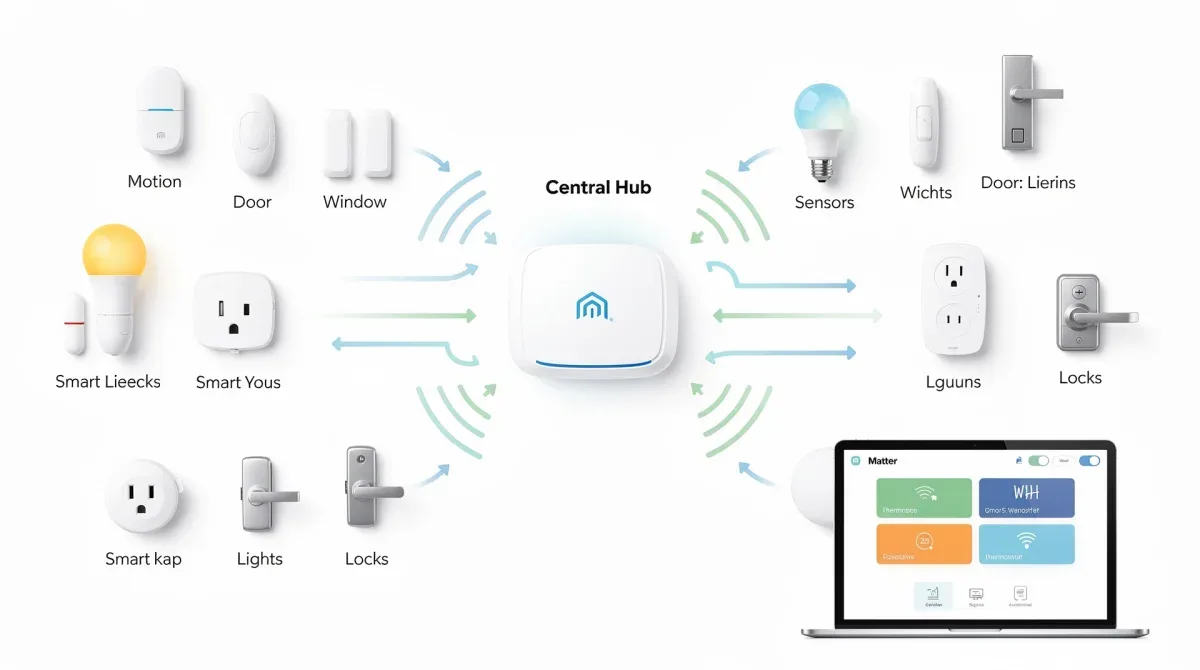
Pairing and commissioning are often the first points of failure when deploying Matter 1.3 devices. This initial handshake between a new device and your Matter controller can be finicky, leading to error messages, timeouts, or devices simply not appearing in your smart home app. Addressing these issues quickly is essential for a smooth setup experience.
One common problem stems from incorrect Matter pairing codes or QR codes. These codes are unique to each device and are crucial for secure commissioning. Double-check that you are entering the correct code or scanning the right QR code. Typos are surprisingly frequent causes of failure. If the code is smudged or unreadable, consult the device's manual or packaging for an alternative.
Strategies for successful pairing
- Proximity is Key: Ensure the device you are trying to pair is very close to your Matter controller during the initial commissioning process. Distance can interfere with the signal.
- Reset Device to Factory Defaults: If a device has been previously paired or is unresponsive, perform a factory reset. This clears old configurations and prepares it for a fresh pairing attempt. Consult the device manual for specific reset procedures.
- Check Matter Controller Status: Confirm your Matter controller is online and in pairing mode. Sometimes, the controller itself might be experiencing temporary issues that prevent new devices from joining.
Another factor can be interference from other wireless signals. During pairing, temporarily disable other Bluetooth or Wi-Fi devices in the immediate vicinity if you are experiencing persistent issues. This reduces potential noise and allows for a cleaner connection. Some Matter devices use Thread for communication, which can be sensitive to environmental interference during initial setup.
Finally, consider the state of your Matter controller's application. Force-closing and reopening the app, or even reinstalling it, can sometimes resolve software glitches that prevent successful pairing. If all else fails, trying to pair the device using a different Matter controller (if available) can help determine if the issue lies with the device or your primary controller. Patience and methodical troubleshooting are your best allies in overcoming pairing challenges.
Advanced diagnostics and expert tips for Matter 1.3
When basic troubleshooting steps don't resolve your Matter 1.3 integration failures, it's time to delve into more advanced diagnostics and leverage expert tips. These methods involve a deeper understanding of network protocols, device logs, and system configurations, often providing insights into persistent or complex issues that defy simple fixes.
One powerful tool is examining device logs. Many Matter controllers and even some advanced smart devices offer diagnostic logs that record communication attempts, errors, and system events. Accessing and interpreting these logs can pinpoint exactly where the communication breakdown is occurring. Look for specific error codes or repeated failures that indicate a pattern. This often requires consulting the manufacturer's documentation for log interpretation guides.
Expert strategies for complex issues
- Utilize Network Analysis Tools: Tools like Wi-Fi analyzers or network sniffers can help identify signal interference, network bottlenecks, or unusual traffic patterns that might be affecting Matter communication.
- Segment Your Network: For larger smart homes, consider creating a separate VLAN (Virtual Local Area Network) specifically for your smart devices. This isolates IoT traffic, improves security, and can prevent conflicts with other network traffic.
- Consult Community Forums and Developer Resources: Online forums, manufacturer support pages, and Matter developer communities are invaluable resources for finding solutions to obscure issues or learning about known bugs and workarounds.
Another advanced tip involves understanding the Thread network, which many Matter devices utilize. If you have multiple Thread border routers (e.g., HomePod minis, Google Nest Hubs), ensure they are all on the same network and communicating effectively. Issues within the Thread mesh can severely impact device responsiveness and stability. Sometimes, a full reset of the Thread network (if your controller supports it) can clear persistent issues.
Furthermore, for those comfortable with command-line interfaces, some Matter controllers offer advanced debugging options. These can provide real-time feedback on device status, connection quality, and error messages that are not exposed through the standard user interface. While requiring a higher technical skill level, these tools can be instrumental in diagnosing the most stubborn integration failures and achieving a truly stable Matter 1.3 smart home.
Maintaining a stable Matter 1.3 smart home ecosystem
Achieving a stable and reliable Matter 1.3 smart home ecosystem is not a one-time setup; it requires ongoing maintenance and proactive management. Even after successfully deploying Matter 1.3 and resolving initial integration failures, continuous attention to updates, network health, and device management is crucial to prevent future issues and ensure optimal performance. A well-maintained smart home is a joy to use, while a neglected one can quickly become a source of frustration.
Regularly updating all components of your smart home is perhaps the most critical maintenance task. This includes your Matter controller, individual smart devices, router firmware, and even the apps on your smartphone. Software updates often contain security patches, performance improvements, and compatibility fixes that are vital for smooth operation. Ignoring these updates can leave your system vulnerable or lead to new integration problems as standards evolve.
Best practices for long-term stability
- Scheduled Updates: Create a routine for checking and applying firmware and software updates across all your smart home components.
- Network Monitoring: Periodically check your Wi-Fi network's performance and signal strength, especially in areas where smart devices are located.
- Device Management: Regularly review your connected devices, remove unused ones, and re-pair any that show persistent connectivity issues.
Beyond updates, proactive network health monitoring is essential. Keep an eye on your Wi-Fi router's performance, checking for unusual drops in speed or frequent disconnections. Consider investing in a reliable router that can handle the demands of numerous smart devices. Over time, your network might become congested, necessitating adjustments to Wi-Fi channels or even an upgrade to a mesh system.
Finally, simplify your smart home where possible. Avoid unnecessary device complexity or redundant automations that can create points of failure. Regularly auditing your devices and automations ensures that your system remains efficient and manageable. By adopting these maintenance practices, you can enjoy the full benefits of a truly integrated and stable Matter 1.3 smart home for years to come, minimizing the chances of encountering frustrating integration failures.
| Key Point | Brief Description |
|---|---|
| Initial Checks | Verify power, network stability, and software updates for quick fixes. |
| Network Configuration | Address Wi-Fi bands, firewalls, and IP conflicts for stable connectivity. |
| Device Compatibility | Ensure Matter 1.3 certification and regular firmware updates. |
| Pairing Issues | Troubleshoot with proximity, factory resets, and controller status checks. |
Frequently asked questions about Matter 1.3 integration
What is the primary benefit of Matter 1.3 for smart homes?▼Matter 1.3 significantly enhances smart home device interoperability, allowing devices from different manufacturers to communicate seamlessly. This reduces the need for multiple apps and hubs, streamlining control and automation for a more unified user experience and simplified setup processes.
Why are my Matter 1.3 devices failing to pair?▼Common pairing failures stem from incorrect QR/pairing codes, devices being too far from the controller, or outdated firmware. Ensure devices are close, codes are correct, and all software is updated. A factory reset of the device can also resolve persistent issues.
How can I check if my existing devices are Matter 1.3 compatible?▼Check the manufacturer's website or the device's companion app for explicit Matter 1.3 certification or compatibility statements. Some devices may require a firmware update to enable Matter 1.3 functionality, so always keep firmware current.
What role does my Wi-Fi network play in Matter 1.3 integration?▼Your Wi-Fi network is crucial. Ensure it's stable, broadcasting on the 2.4 GHz band for many smart devices, and free from congestion. Router firewall settings and outdated firmware can also hinder communication, so regular checks are vital.
What should I do if my Matter 1.3 issue persists after basic troubleshooting?▼If basic troubleshooting fails, delve into advanced diagnostics. Examine device logs, use network analysis tools, consider network segmentation, and consult online community forums for specific solutions. A full Thread network reset might also be necessary for some issues.
Conclusion
Successfully navigating the complexities of deploying Matter 1.3 integration failures is entirely achievable with a methodical approach and a little patience. By understanding the foundational improvements of Matter 1.3, performing diligent initial checks, addressing network configuration pitfalls, ensuring device compatibility, and effectively troubleshooting pairing issues, you can resolve most smart home integration problems quickly. Maintaining a stable Matter 1.3 ecosystem through regular updates and proactive management will ensure your smart home remains a seamless and efficient environment, providing the convenience and automation you expect without persistent headaches. The future of integrated smart homes is here, and with these strategies, you are well-equipped to make the most of it.
