SSD Health Alert: PCIe 5.0 Throttling at 80°C and Cooling Solutions
PCIe 5.0 SSDs often throttle performance at 80°C due to their high operating speeds and power consumption, necessitating robust thermal cooling solutions to prevent data degradation and ensure sustained peak operation in modern systems.
The advent of PCIe 5.0 SSD throttling has introduced a new challenge for PC enthusiasts and professionals alike. These cutting-edge storage devices, while offering unprecedented speeds, are also prone to significant heat generation, often leading to performance limitations at temperatures as low as 80°C. Understanding this phenomenon and implementing effective cooling solutions is paramount to unlocking their full potential and ensuring long-term reliability.
The physics behind PCIe 5.0 SSD heat generation
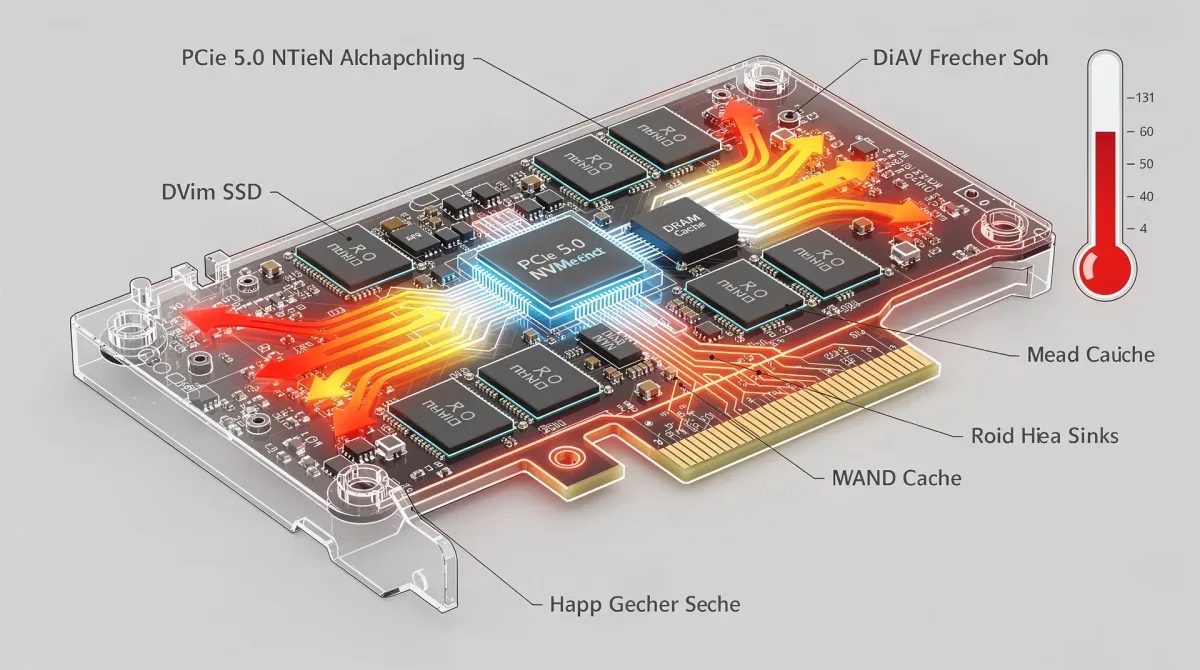
PCIe 5.0 SSDs represent a significant leap in storage technology, delivering sequential read and write speeds that can exceed 10,000 MB/s. However, this immense performance comes at a cost: increased power consumption and, consequently, higher heat output. The components within these drives, particularly the controller and NAND flash chips, are working harder than ever before, generating substantial thermal energy during intensive operations.
When an SSD reaches a critical temperature, typically around 80°C for PCIe 5.0 drives, it initiates a process known as thermal throttling. This mechanism is a self-preservation measure, designed to protect the drive's sensitive components from irreversible damage. While essential for longevity, throttling severely impacts performance, reducing transfer speeds and potentially increasing latency.
Understanding the role of the SSD controller
The SSD controller is the brain of the drive, managing data flow, error correction, and wear leveling. In PCIe 5.0 SSDs, these controllers are incredibly complex and powerful, processing vast amounts of data at lightning speeds. This intensive workload directly translates to increased power draw and heat generation, making the controller a primary hotspot within the drive.
- High-speed data processing: Faster transfer rates demand more computational power from the controller.
- Advanced error correction: Complex algorithms for data integrity add to the controller's workload.
- Firmware operations: Background tasks and optimizations contribute to sustained heat.
The efficiency of the controller's heat dissipation is crucial. Manufacturers often integrate thermal pads and basic heatsinks directly onto the controller chip, but these may prove insufficient under sustained heavy loads, especially in cases with limited system airflow.
NAND flash and DRAM temperature sensitivity
While the controller is the main heat generator, the NAND flash memory chips and the DRAM cache also contribute to the overall thermal profile of the SSD. These components are sensitive to high temperatures, which can degrade their performance and shorten their lifespan. Excessive heat can lead to data corruption or even complete drive failure over time.
- Data integrity: High temperatures can destabilize flash cells, increasing error rates.
- Lifespan reduction: Prolonged exposure to heat accelerates wear on NAND flash.
- Performance degradation: DRAM cache becomes less efficient, impacting overall drive speed.
The interplay between these components means that effective cooling must address the entire drive, not just isolated hotspots. A comprehensive thermal management strategy is essential to prevent the entire drive from reaching critical temperatures and triggering throttling.
In essence, the high performance of PCIe 5.0 SSDs inherently generates more heat. This heat, if not properly managed, forces the drive to reduce its operational speed to protect its components, highlighting the critical need for advanced cooling solutions to maintain peak efficiency.
The impact of thermal throttling on system performance
Thermal throttling isn't just a minor inconvenience; it can significantly degrade the user experience and overall system performance. When a PCIe 5.0 SSD throttles, its advertised blistering speeds can drop dramatically, sometimes to levels comparable to older, slower drives. This performance reduction can be particularly noticeable during demanding tasks such as large file transfers, video editing, or gaming with asset-intensive loads.
The consequences extend beyond just slower loading times. In professional environments, where time is money, reduced SSD performance can translate into significant productivity losses. For gamers, it can mean stuttering, longer load screens, and a less immersive experience. The promise of PCIe 5.0 speeds remains unfulfilled if thermal issues are not adequately addressed.
Reduced transfer speeds and increased latency
The most immediate and obvious symptom of thermal throttling is a noticeable reduction in data transfer speeds. What might start as a 12 GB/s read operation can quickly plummet to a fraction of that speed once the drive hits its thermal limit. This is because the controller dynamically reduces its clock speed and power consumption to lower the temperature, directly impacting throughput.
Alongside slower speeds, latency can also increase. The drive takes longer to respond to read and write requests, creating bottlenecks in the data pipeline. This can affect applications that rely on quick access to storage, making the entire system feel less responsive and snappy.
Potential long-term hardware damage
While throttling is a protective measure, repeated and prolonged exposure to high temperatures can still have long-term detrimental effects on the SSD. Heat accelerates the degradation of electronic components, particularly the NAND flash cells. This can lead to a reduced lifespan for the drive, increasing the risk of premature failure and data loss.
- Component wear: High temperatures stress microchips, leading to faster wear.
- Solder joint degradation: Heat cycles can weaken solder connections over time.
- Increased failure rate: Components operating at their thermal limits are more prone to unexpected failures.
Investing in a PCIe 5.0 SSD is a significant commitment, and protecting that investment requires proactive thermal management. Ignoring the heat issue can lead to a shorter operational life for the drive and the potential need for early replacement, negating the initial performance benefits.
Ultimately, thermal throttling transforms a high-performance component into a bottleneck, undermining the system's potential and posing risks to the drive's longevity. Addressing these thermal challenges is not merely about achieving peak speeds but also about ensuring the stability and durability of your storage investment.
Understanding the 80°C throttling threshold
The 80°C threshold for PCIe 5.0 SSD throttling is not an arbitrary number; it's a carefully determined operational limit set by manufacturers to balance performance and component longevity. While some drives might have slightly different thresholds, 80°C is a common point where the internal firmware triggers protective measures. This temperature is critical because exceeding it for prolonged periods can lead to accelerated degradation of the delicate silicon and flash memory within the drive.
Modern SSDs are equipped with multiple thermal sensors that constantly monitor the temperature of various components, especially the controller. When any of these sensors report a temperature at or above the predefined threshold, the drive's firmware intervenes to prevent damage. This intervention typically involves reducing the operational frequency of the controller and lowering the power supplied to the NAND flash modules.
Why 80°C is a critical point for silicon
Silicon, the primary material used in microchips, becomes less stable and more prone to errors as its temperature rises. At 80°C and beyond, the electrical characteristics of silicon components can change, leading to increased leakage current, reduced signal integrity, and a higher probability of bit errors. These factors can directly impact the reliability and data integrity of the SSD.
- Electron migration: High heat accelerates the movement of atoms, potentially damaging circuits.
- Increased resistance: Electrical resistance in circuits increases with temperature, affecting performance.
- Reduced gate reliability: Transistor gates can degrade faster under thermal stress.
Manufacturers design these components to operate within specific temperature ranges to ensure maximum reliability over their expected lifespan. Pushing them beyond these limits, even if only occasionally, contributes to cumulative stress and premature failure.
Manufacturer guidelines and warranty implications
Most SSD manufacturers specify an operating temperature range in their product documentation. Typically, this range is between 0°C and 70°C for optimal performance and longevity. While drives can often withstand temperatures up to 80°C or even 85°C before throttling, sustained operation at the upper end of this spectrum is not recommended.
Operating an SSD consistently above its recommended temperature can potentially void its warranty, as it indicates usage outside of the specified conditions. Users should consult their drive's specific documentation for exact thermal guidelines. Adhering to these limits is crucial not only for performance but also for protecting your investment and ensuring warranty coverage.
The 80°C throttling point serves as a crucial safeguard, but it also highlights the inherent thermal challenges of high-performance PCIe 5.0 SSDs. Understanding this limit is the first step towards implementing effective cooling strategies that keep your drive running optimally and reliably for years to come.
Thermal Cooling Solution 1: High-performance passive heatsinks
One of the most straightforward and effective methods to combat PCIe 5.0 SSD throttling is the use of high-performance passive heatsinks. These devices are designed to absorb and dissipate heat away from the SSD's components without requiring any active power or moving parts. They rely on principles of conduction and convection to transfer thermal energy from the hot SSD to the surrounding air.

Modern passive heatsinks for PCIe 5.0 SSDs are often significantly larger and more elaborate than those found on previous generations. They feature extensive fin arrays, heat pipes, and sometimes even multiple layers of heat-dissipating materials to maximize their surface area and cooling efficiency. Many high-end motherboards now include dedicated M.2 heatsinks, but for the most demanding drives, aftermarket solutions can offer superior performance.
Materials and design considerations
The effectiveness of a passive heatsink largely depends on its material and design. Aluminum and copper are the most common materials due to their excellent thermal conductivity. Copper offers superior heat transfer but is heavier and more expensive, while aluminum provides a good balance of performance and cost.
- Fin density: Higher fin density increases surface area for heat dissipation.
- Heat pipes: Some advanced heatsinks incorporate heat pipes to efficiently move heat away from the source.
- Thermal pads: High-quality thermal pads ensure optimal contact between the SSD and the heatsink.
The design also considers airflow. Even passive heatsinks benefit from good case airflow, as moving air helps carry away the heat radiated by the fins. A well-designed heatsink will have channels or gaps that encourage air movement, even if it's just natural convection.
Installation and compatibility tips
Installing a passive heatsink is generally a simple process, but compatibility is key. Ensure the heatsink you choose fits your specific M.2 slot and doesn't interfere with other components like GPUs or CPU coolers. Check the height clearance within your PC case.
When installing, always use the provided thermal pads, ensuring they make full contact with the SSD controller and NAND chips. Avoid overtightening screws, as this can damage the SSD. For motherboards with integrated heatsinks, ensure proper reapplication of thermal pads if the original ones have degraded.
High-performance passive heatsinks offer a reliable and silent solution to keep PCIe 5.0 SSDs cool. By efficiently drawing heat away from critical components, they help maintain consistent performance without adding noise or complexity to your system, making them an excellent first line of defense against thermal throttling.
Thermal Cooling Solution 2: Active fan-based coolers
While passive heatsinks are effective, some extreme scenarios or heavily utilized PCIe 5.0 SSDs might require more aggressive cooling. This is where active fan-based coolers come into play. These solutions combine the heat dissipation capabilities of a heatsink with the active airflow generated by a small fan, significantly enhancing thermal performance.
Active coolers are typically compact units that attach directly to the M.2 slot, often replacing the motherboard's integrated heatsink. The integrated fan actively pushes or pulls air over the heatsink fins, accelerating the heat transfer process and allowing the SSD to operate at much lower temperatures, even under sustained peak loads. This can be particularly beneficial in cases with poor overall airflow or when the SSD is located in a thermally constrained area.
Advantages of forced airflow
The primary advantage of active cooling is the forced airflow it provides. Unlike passive solutions that rely on natural convection, a fan actively moves air, dramatically increasing the rate at which heat is removed from the heatsink. This allows for more effective cooling, especially when the ambient temperature inside the case is high.
- Lower temperatures: Fans can reduce SSD temperatures by an additional 10-20°C compared to passive solutions.
- Consistent performance: Maintains optimal temperatures even during prolonged heavy workloads.
- Overcoming poor case airflow: Provides localized cooling regardless of general system airflow.
For users who frequently engage in tasks that push their SSDs to the limit, such as large database operations, extensive gaming, or content creation, an active cooler can be a game-changer, ensuring that the drive never throttles.
Noise and power considerations
The main drawback of active fan-based coolers is the potential for added noise. While the fans are typically small, they can still contribute to the overall noise profile of the PC, especially if they are running at high RPMs. Users sensitive to noise might find this less appealing than a completely silent passive solution.
Additionally, active coolers require a power connection, usually a small 3-pin or 4-pin fan header on the motherboard. This adds a minor cable management consideration. However, many modern motherboards offer fan control, allowing users to adjust fan speeds based on temperature, balancing cooling performance with noise levels.
Active fan-based coolers are a powerful option for users seeking maximum thermal performance for their PCIe 5.0 SSDs. While they introduce a small amount of noise and require a power connection, the significant reduction in operating temperatures can be invaluable for maintaining peak performance and ensuring the longevity of your high-speed storage.
Thermal Cooling Solution 3: Custom water blocks and advanced solutions
For the ultimate in PCIe 5.0 SSD thermal management, custom water blocks and other advanced cooling solutions offer unparalleled performance. These are typically reserved for high-end builds, custom liquid cooling loops, or scenarios where every degree of temperature reduction is critical. While more complex and expensive, they provide superior heat dissipation capabilities that can push SSDs well below their typical operating temperatures.
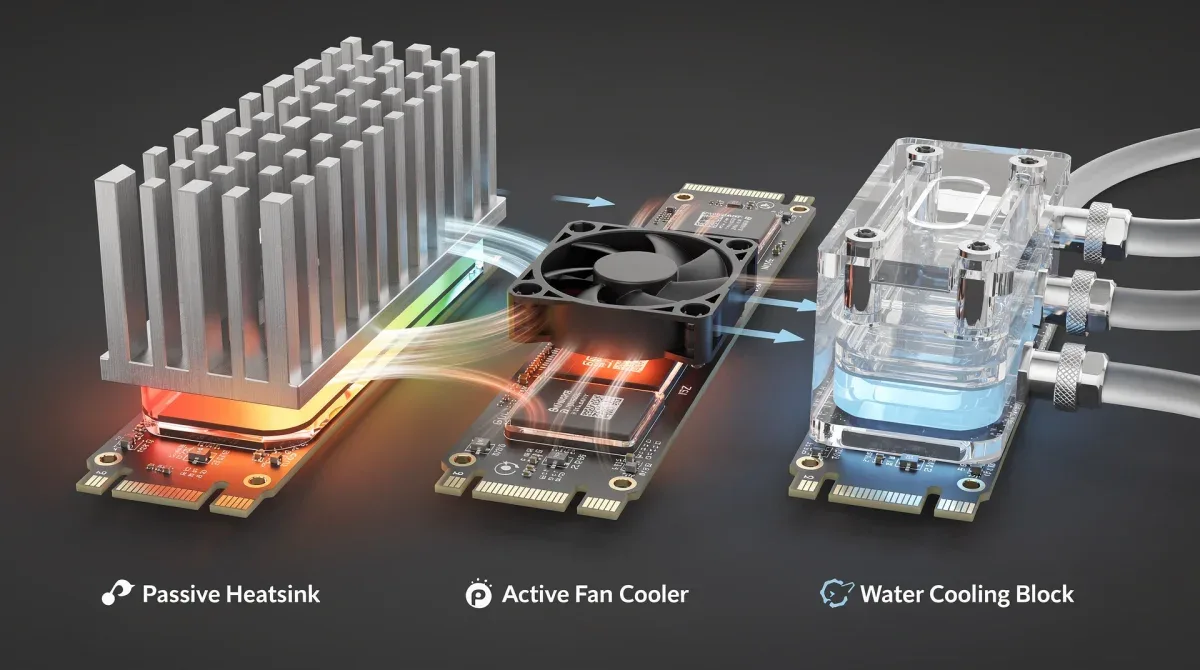
Custom water blocks for M.2 SSDs integrate directly into an existing liquid cooling loop, using the same coolant that cools the CPU and GPU. These blocks are designed to make direct contact with the SSD's controller and NAND chips, efficiently transferring heat to the liquid, which is then carried away to a radiator for dissipation. This method can keep SSDs remarkably cool, often running at temperatures significantly lower than air-cooled alternatives, even under the most extreme loads.
Integrating into a custom loop
Integrating an SSD water block requires an existing or planned custom liquid cooling loop. The block typically connects with standard G1/4" fittings and becomes part of the loop's flow path. Careful planning is needed to ensure proper tubing runs and to avoid restricting flow to other components.
- Component selection: Choose a water block compatible with your specific SSD and M.2 slot.
- Loop design: Plan the integration into your existing loop, considering flow order and tubing runs.
- Maintenance: Regular maintenance of the liquid cooling loop, including coolant changes, is essential.
This level of cooling is often pursued by extreme overclockers, benchmarkers, or users building showpiece systems where aesthetics and maximum performance are equally important. The visual appeal of a liquid-cooled SSD can also be a significant draw.
Other advanced cooling considerations
Beyond traditional water blocks, some niche advanced solutions exist, such as phase-change cooling for extreme overclocking, though these are impractical for everyday use. More commonly, optimizing overall case airflow remains a critical, albeit less dramatic, advanced solution. Ensuring a positive pressure setup, using high-static-pressure fans, and routing cables efficiently can significantly improve ambient temperatures around the SSD.
Advanced thermal pads and liquid metal thermal interfaces can also enhance heat transfer from the SSD to any cooling solution, whether passive, active, or liquid. These small details can collectively contribute to a few crucial degrees of temperature reduction, preventing throttling.
Custom water blocks and advanced cooling methods represent the pinnacle of thermal management for PCIe 5.0 SSDs. While they demand a higher investment in terms of cost and complexity, they deliver unmatched cooling performance, ensuring your drive operates at its absolute best, free from any thermal constraints.
Best practices for preventing SSD overheating
Beyond specific cooling solutions, implementing general best practices for PC building and maintenance can significantly contribute to preventing PCIe 5.0 SSD overheating. A holistic approach to thermal management ensures that all components operate within optimal temperature ranges, leading to a more stable and high-performing system. These practices are often simple yet highly effective.
One fundamental practice is ensuring adequate airflow within your PC case. A well-ventilated case with a balanced fan configuration (intake and exhaust) helps to dissipate heat from all components, including the SSD. Poor airflow can lead to hot spots, where heat accumulates and struggles to escape, making any installed cooling solution less effective.
Optimizing case airflow and fan configuration
The layout and configuration of your case fans play a crucial role in maintaining low internal temperatures. Aim for a positive pressure setup, where intake airflow slightly exceeds exhaust airflow. This helps to prevent dust buildup and ensures a constant supply of cool air to your components.
- Strategic fan placement: Position intake fans at the front/bottom and exhaust fans at the top/rear.
- Cable management: Route cables neatly to avoid obstructing airflow paths.
- Regular cleaning: Keep dust filters and fan blades clean to maintain optimal airflow.
Consider using high-static-pressure fans for areas where air needs to be pushed through restrictive elements like radiators or tight spaces, and high-airflow fans for open areas to move a large volume of air.
Monitoring SSD temperatures
Regularly monitoring your SSD's temperature is a critical best practice. Several software tools, such as HWMonitor, CrystalDiskInfo, or your motherboard's utility software, can provide real-time temperature readings. This allows you to observe how your drive performs under different workloads and identify potential overheating issues before they lead to throttling.
Pay attention to both idle and load temperatures. If your SSD is consistently running close to or above 70°C, even with a cooling solution, it might indicate an underlying airflow problem or that your cooling solution isn't robust enough for your specific usage patterns. Early detection allows for timely intervention, preventing long-term damage.
By combining dedicated cooling solutions with smart case design, proper fan configuration, and diligent temperature monitoring, you can create an environment where your PCIe 5.0 SSD can truly shine. These best practices are essential for maximizing performance, ensuring longevity, and maintaining the overall health of your high-speed storage investment.
| Key Point | Brief Description |
|---|---|
| PCIe 5.0 Throttling | High-speed SSDs reduce performance at ~80°C to prevent damage. |
| Passive Heatsinks | Silent, effective heat dissipation using metal fins and thermal pads. |
| Active Fan Coolers | Enhanced cooling with integrated fans, ideal for heavy workloads. |
| Water Blocks | Ultimate cooling by integrating SSD into custom liquid cooling loops. |
Frequently asked questions about PCIe 5.0 SSD cooling
Why do PCIe 5.0 SSDs generate so much heat?▼PCIe 5.0 SSDs achieve extremely high data transfer speeds, which requires powerful controllers and rapid processing by NAND flash memory. This intensive operation translates directly into higher power consumption and significant heat generation, especially during sustained read/write cycles, leading to their inherent thermal challenges.
Is 80°C a dangerous temperature for an SSD?▼While 80°C is the typical threshold where PCIe 5.0 SSDs begin to throttle to protect themselves, sustained operation at or above this temperature is not ideal. It can accelerate component degradation, reduce the drive's lifespan, and negatively impact performance. Maintaining temperatures below 70°C is generally recommended for optimal longevity and stability.
Can my motherboard's M.2 heatsink handle a PCIe 5.0 SSD?▼Many modern motherboards come with integrated M.2 heatsinks, some of which are designed with PCIe 5.0 in mind. However, the effectiveness varies greatly. For optimal performance, especially under heavy loads, a dedicated aftermarket high-performance passive heatsink or an active fan-based cooler might be necessary to prevent throttling.
What are the trade-offs of using active fan coolers for SSDs?▼Active fan coolers offer superior thermal performance by actively moving air, leading to lower operating temperatures. The main trade-offs include potential added noise from the fan, especially under load, and the requirement for a power connection, which can complicate cable management slightly compared to passive solutions.
How often should I monitor my SSD's temperature?▼It's a good practice to periodically monitor your SSD's temperature, especially when performing demanding tasks or after making changes to your system's cooling setup. Using software like CrystalDiskInfo or HWMonitor provides real-time data, helping you ensure your drive operates within safe thermal limits and prevent unexpected performance drops.
Conclusion
The exhilarating speeds of PCIe 5.0 SSDs come with a critical caveat: their propensity for thermal throttling at around 80°C. This phenomenon, while a protective measure, can severely hinder performance and potentially shorten the drive's lifespan. By understanding the underlying physics of heat generation and implementing effective cooling solutions—whether through robust passive heatsinks, dynamic active fan coolers, or advanced custom water blocks—users can unlock the full potential of their high-speed storage. Coupled with best practices in case airflow and diligent temperature monitoring, these strategies ensure that your investment in cutting-edge storage technology delivers consistent, reliable, and unthrottled performance for years to come.
